
What are Strings?
A string in Python refers to letters, numbers, symbols, spaces, or even emojis that are arranged in a specific order.
We can use strings in Python to store multiple string-based information, such as names, messages, sentences, and file paths.
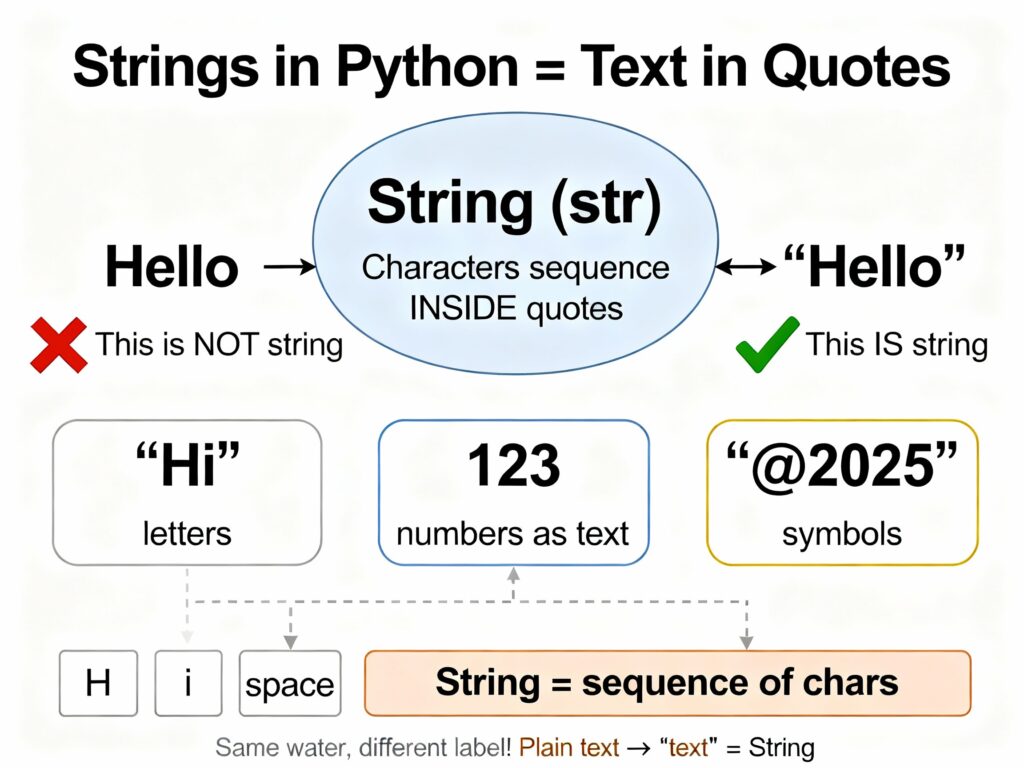
- Python stores every string as immutable, which means once a string is created, you cannot directly change any of its characters.
- In simple words, a string is text, and Python keeps it safe by not allowing you to change its characters directly.
Important Examples of Strings:
# Strings with single quotes
title = 'Learning Python Strings!'
print(title)

# Strings with double quotes
note = "Coding becomes easy when you practice daily."
print(note)

# Strings with triple quotes (multiline string)
details = """This is a short description.
It covers multiple lines.
Python allows this using triple quotes."""
print(details)
Meaning of the Examples
- Single quotes are used to create short text values. For example, it shows a simple sentence stored inside single quotes.
- Double quotes work exactly like single quotes, but it’s useful when your text includes apostrophes.
- Triple quotes used to store large text blocks or multiline messages. This is perfect for documentation, long notes, or formatted output.
What are apostrophes in Python?
An apostrophe is a small punctuation mark used in English. Let’s see the example between single and double quotes representation.
- Example (problem):
text = 'I don’t know'
- Better:
text = "I don’t know"
- So double quotes are used to avoid errors when your string contains ‘ inside it.
How Python String Concepts Are Used in a Real Project
Imagine you are building a Food Delivery Application like Zomato or Swiggy. Strings play an extremely role in almost every part of this system.
- When a customer places an order, the backend must prepare a clear, readable summary message.
- This all the data send to:
- Customer’s phone
- Delivery partner’s app
- Restaurant panel
- Admin dashboard
- This entire summary is built using Python strings.
Step-by-Step Breakdown
- First, storing all the data using strings.
- Then creating a message so we join multiple pieces of text.
- Developers use f-strings to format the order message professionally.
- Finally using a Type Casting to convert numbers into strings.
1) Storing Customer & Food Data Using Strings
customer_name = "Riya Sharma"
item = "Margherita Pizza"
address = "45 Sunrise Apartments, Mumbai"
2) String Concatenation: Creating a Message
msg = "Order for " + customer_name + " has been received."
- We join multiple pieces of text to build a sentence.
3) String Formatting: Cleaner Summary Message
amount = 299.50

summary = f"""
Order Summary:
Customer: {customer_name}
Item: {item}
Total Amount: ₹{amount}
Delivery Address: {address}
"""

print(summary)
- Developers use f-strings to format the order message professionally.
- This looks exactly like a real company message.
4) Type Casting: Converting Numbers to Strings
price = 250
tax = 18
final = price + tax

message = "Payable Amount: " + str(final)
- Here, prices, taxes, and discounts are numbers, so we converted them into strings to display.
5) String Slicing: Hiding Sensitive Data
phone = "9876543210"
masked = phone[:2] + "******" + phone[-2:]
print(masked)   # Output: 98******10
- Then the app masks part of the phone number to protect privacy.
6) Multi-line Strings: Sending Long Messages
restaurant_msg = """
New Online Order Received!

Please prepare the food quickly.
Delivery partner will arrive at the pickup location soon.
"""
- Restaurants receive detailed order messages using triple quotes:
7) String Methods: Cleaning User Input
raw = "   EXTra cheese please   "
cleaned = raw.strip().lower()
- You already knows sometimes user contains extra spaces or mixed casing.
- So, this method ensures the message is readable and uniform.
String Indexing and Slicing
A string is refers to a individual characters placed one after another. Python gives each character a numbered position (index), so we can easily access or extract specific parts of the string.
What Is String Indexing?
Indexing means selecting a single character from a string using its position number.
Python starts counting from:
- 0 for the first character
- 1 for the second
- …
- n−1 for the last
Python also supports negative indexing, which starts from the end:
- -1 is the last character
- -2 is the second last, and so on.
Example of Indexing:
word = "Sunrise"

print(word[1])   # Output: u (second character)
print(word[-3])  # Output: i (third character from the end)
What Is String Slicing?
String slicing means extracting a specific part of the string. For example:
phrase = "AdventureTime"

# Slice: characters from index 0 to 6 (excluding 6)
print(phrase[0:7])     # Output: Adventu

# Slice: from index 4 to the end
print(phrase[4:])      # Output: ntureTime

# Slice: from start to index 3
print(phrase[:4])      # Output: Adve

# Slice: every second character
print(phrase[::2])     # Output: AvnurTi
Meaning of phrase [0:0]
- phrase [0:7] = Takes characters from index 0 up to 6 → Adventu
- phrase [4:] = Starts at index 4 → continues till the end → ntureTime
- phrase [:4] = Starts at the beginning → stops before index 4 → Adve
- phrase [::2] = Takes every alternate character → AvnurTi
Essentials String Operations In Python
Python provides powerful operations that allow us to combine, repeat, or measure strings.
1. String Concatenation (Joining Strings)
- Concatenation means joining two or more strings together to create a new string. Python uses the + operator to merge text smoothly.
- This operation does not change the original strings because strings are immutable. For example:
first_name = "Riya"
last_name = "Sharma"

full_name = first_name + " - " + last_name
print(full_name)

# Output: Riya - Sharma
2. String Repetition
- Repetition means we can create a multiple copies of the same string. Python providing a * operator, which repeats the string as many times as the number you specify.
- This operation is helpful when we are creating patterns, decorative output, or repeated messages.
pattern = "Hi! "
print(pattern * 4)

# Output: Hi! Hi! Hi! Hi!
3. Finding String Length
- The len() function tells you how many characters are present in a string, and this includes letters, numbers, spaces, and even hidden characters like \n.
- This operation is especially useful in validation, formatting, and slicing operations.
message = "Learn Python Today"
print(len(message))

# Output: 19
String Methods In Python
- Python provides many built-in string methods that help you clean, modify, analyze, and transform text easily.
- This method performs a specific task, so you don’t need to write long logic manually.
1. upper() and lower()
These methods convert all characters of a string into uppercase or lowercase.
- upper() converts every letter to CAPITAL
- lower() converts every letter to small
city = "MuMbAi"
print("Uppercase:", city.upper())     # Output: MUMBAI
print("Lowercase:", city.lower())     # Output: mumbai
2. strip()
- It removes extra spaces at the beginning and the end of a string.
- This method is useful for cleaning user input because people sometimes add extra spaces in inputs.
user_input = "   Learn Python   "
cleaned = user_input.strip()
print("Before:", repr(user_input))
print("After :", repr(cleaned))
3. replace()
- This method replaces any specific part of the string with another value.
- Perfect when you want to update a specific word inside a sentence
sentence = "Coding in Ruby is easy, but Ruby is not popular."
updated = sentence.replace("Ruby", "Python")
print(updated)

# Output: Coding in Python is easy, but Python is not popular.
4. split()
- Breaks a string into smaller parts and returns a list.
- It’s useful when we’re dealing with comma-separated or symbol-separated data.
data = "red#green#blue#yellow"
colors = data.split("#")
print(colors)

# Output: ['red', 'green', 'blue', 'yellow']
5. join()
- This method joints list elements into a single string using a separator.
words = ["Code", "Create", "Build"]
sentence = " | ".join(words)
print(sentence)

# Output: Code | Create | Build
6. find()
- When you search for a small piece of text (a substring) inside a bigger text (a string), Python will tell you the position where that small text begins.
text = "Welcome to the Python Universe"
position = text.find("Python")
print("Index:", position)
- Output of this program:
Index: 11
- here, “Python” begins at position 11 so our output will be 11.
7. isnumeric() and isalpha()
- Checks what type of characters are available inside the string.
- isnumeric() → True if the string contains only digits
- isalpha() → True if the string contains only letters
value1 = "98245"
value2 = "Learning"

print(value1.isnumeric())   # True
print(value2.isalpha())     # True
Escape Characters
An escape character is a special symbol that is used to insert characters into a string. It always begins with a backslash (\).
These helps us to include:
- Quotes inside quotes
- New lines
- Tabs
- Special symbols
- Characters with special meaning
Example of Escape Characters:
1) Using double quotes inside a double-quoted string
dialogue = "Teacher said, \"Always keep learning Python!\""
print(dialogue)
Output:
Teacher said, "Always keep learning Python!"
2) Using single quotes inside a single-quoted string
weather = 'Today\'s forecast says it\'ll rain in the evening.'
print(weather)
Output:
Today's forecast says it'll rain in the evening.
More Escape Characters
1) New line (\n): It adds a line break inside a string
message = "Day 1: Learn basics\nDay 2: Practice coding"
print(message)
Output:
Day 1: Learn basics
Day 2: Practice coding
2) ab space (\t): Adds a horizontal tab space
menu = "Item\tPrice\nCake\t₹120"
print(menu)
Output:
Item    Price
Cake    ₹120
3) Backslash (\\): Prints a single backslash.
path = "C:\\NewFolder\\Images"
print(path)
Output:
C:\NewFolder\Images
What Is String Formatting In Python?
String formatting insert a variables, values, or expressions into as string in a clean way. It means, replace a variables and added its value inside a sentence.
We can use two important methods:
1. f-strings (Recommended):
- f-strings provide a easy way to insert variables directly inside curly braces {}. They start with the letter f before the string.
student = "Riya"
marks = 88
subject = "Maths"

message = f"{student} scored {marks} marks in {subject}."
print(message)
Output:
Riya scored 88 marks in Maths.
If we remove the f from the sentences, it will look like this:
student = "Riya"
marks = 88

message = "{student} scored {marks} marks."    # Print without f
print(message)
Output will be:
{student} scored {marks} marks.
- It means Python does not replace the variables.
2. format() Method:
The format() method is another way to insert variables inside a string. Let’s see the example:
city = "Surat"
temperature = 32

report = "The temperature in {} is currently {}°C.".format(city, temperature)
print(report)
Output of the code:
The temperature in Surat is currently 32°C.
Immutable Nature of Strings
Strings are immutable, meaning we can’t change, replace, or edit their characters directly.
Example: Trying to Modify a String Directly
name = "Rocky"
name[2] = "d"    # Trying to replace 'c' with 'd'
Output:
TypeError: 'str' object does not support item assignment
- This error message means, we cannot edit characters inside a string because the string is read-only.
Exercise For Learners:
Task: Take a string and print the character that appears in the middle of the string. If the string length is even, print the two middle characters.
Example Input:
"Python"
Expected Output:
th
Learn Other Topics Also:
- What is type casting in Python?
- What are numbers in Python?
- How we can use data types in Python?
- What are variables in Python?

M.Sc. (Information Technology). I explain AI, AGI, Programming and future technologies in simple language. Founder of BoxOfLearn.com.