
A tuple in Rust is like a small box where you keep multiple values together. Each value inside that can be different types like number, text, true/false, etc.
The tuple has a fixed size, meaning once you decide how many values it has, that cannot change later.
Tuples are written using round brackets ( ), and values are separated by commas.
For example, if you want to store a student’s name, age, and marks together, you can put them in a tuple like this: (“Alice”, 20, 85.5)
Syntax of Tuples
We can easily create tuples by its simple syntax:
let tuple_name = (value1, value2, value3, ...);
Example:
fn main() {
    // Creating a tuple with mixed types
    let car = ("Tesla", 2025, true);

    // Accessing tuple elements using index
    println!("Car Brand: {}", car.0);
    println!("Manufacturing Year: {}", car.1);
    println!("Is Electric? {}", car.2);
}
Output:
Car Brand: Tesla
Manufacturing Year: 2025
Is Electric? true
Properties of Tuples
- Fixed Size: Once you create a tuple, you cannot add or remove items, and its size stays the same for the entire program.
- Mixed Types: A tuple can hold values of different data types. For example, one element can be a number, another a string, and another a boolean.
- Index Access: Same as an array, you can access tuple elements by their position number, but the index starts from 0 in the tuple.
Declaring Tuples
We can declare tuples with any combination of types.
For Examples:
fn main() {
    let student = ("Alice", 21, 8.5);

    println!("Name: {}", student.0);   // Index 0 → "Alice"
    println!("Age: {}", student.1);    // Index 1 → 21
    println!("GPA: {}", student.2);    // Index 2 → 8.5
}
Output:
Name: Alice
Age: 21
GPA: 8.5
How To Access Tuple Elements In Rust?
In Rust, if we want to choose values from a tuple, we can use the dot ( . ) operator followed by the index number of the element.
Example:
fn main() {
    let car = ("Tesla", 2025, true);

    println!("Car Brand: {}", car.0);     // Access first element
    println!("Model Year: {}", car.1);    // Access second element
    println!("Is Electric? {}", car.2);   // Access third element
}
Output:
Car Brand: Tesla
Model Year: 2025
Is Electric? true
Destructuring Tuples In Rust
Destructuring a tuple means taking a tuple and breaking it into separate variables so you can use each value directly.
- Instead of accessing values by .0, .1, etc., you assign them to variables in one step.
- Makes the code cleaner and easier to read.
Example:
fn main() {
    // Tuple representing a product (name, price, stock)
    let product = ("Laptop", 1200, 15);

    // Destructuring the tuple into separate variables
    let (name, price, stock) = product;

    println!("Product Name: {}", name);
    println!("Price: ${}", price);
    println!("Stock Available: {}", stock);
}
Output:
Product Name: Laptop
Price: $1200
Stock Available: 15
Nested Tuples In Rust
A nested tuple is a tuple that has another tuple inside it as one of its elements.
- It useful when you want to group related data hierarchically.
- You can still access the inner tuple’s values by chaining dot operators.
For Example:
fn main() {
    // Tuple representing a student: (ID, (Name, Age), Grade)
    let student = (101, ("Alice", 20), "A");

    println!("Student ID: {}", student.0);
    println!("Name: {}", (student.1).0);   // Accessing inner tuple element
    println!("Age: {}", (student.1).1);    // Accessing inner tuple element
    println!("Grade: {}", student.2);
}
Output:
Student ID: 101
Name: Alice
Age: 20
Grade: A
Returning Tuples from Functions
In Rust, a function can return multiple values at once by putting them in a tuple.
- Instead of returning just one value, you can group several values into a tuple.
- When you call the function, you can destructure the tuple into separate variables to use each value.
For Example:
fn get_book_info() -> (&'static str, &'static str, i32) {
    // Returns a tuple: (Title, Author, Year Published)
    ("The Rust Book", "Steve", 2025)
}

fn main() {
    // Destructuring the returned tuple into variables
    let (title, author, year) = get_book_info();

    println!("Book: {}, Author: {}, Year: {}", title, author, year);
}
Output:
Book: The Rust Book
Author: Steve
Year: 2025
Pattern Matching with Tuples
Pattern matching with tuples allows you to check the values inside a tuple and take different actions depending on the values.
- You can match exact values, check conditions (like if x == y), or destructure the tuple into variables for use.
Example:
fn main() {
    // Tuple representing a GPS coordinate (latitude, longitude)
    let location = (40, 40);

    match location {
        (lat, lon) if lat == lon => println!("This location is on the diagonal line!"),
        (lat, lon) if lat > lon => println!("Latitude is greater than longitude: ({}, {})", lat, lon),
        (lat, lon) => println!("Longitude is greater or equal to latitude: ({}, {})", lat, lon),
    }
}
Output:
This location is on the diagonal line!
Example: Iterating Over Tuples
Tuples themselves cannot be directly looped over, because they have a fixed size and different types. But when you have a collection of tuples (like an array or vector), you can iterate over the collection.
Example:
fn main() {
    // Array of tuples: (Book Title, Copies Available)
    let library = [("Rust Guide", 4), ("Learning Python", 2), ("Web Development", 6)];

    for (title, copies) in library {
        println!("Book: '{}', Copies Available: {}", title, copies);
    }
}
Output:
Book: 'Rust Guide', Copies Available: 4
Book: 'Learning Python', Copies Available: 2
Book: 'Web Development', Copies Available: 6
Mini Project: Student Grade Tracker
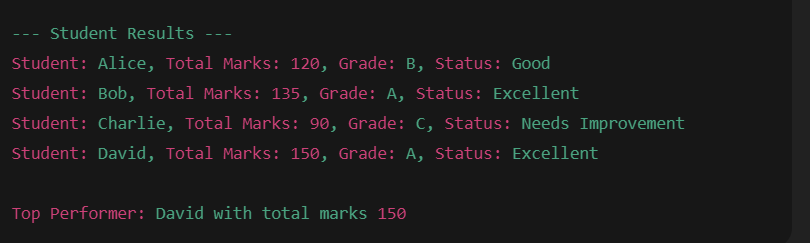
This project stores students’ info (name, marks in three subjects) using tuples. It calculates total marks, grade, and status, demonstrating all tuple concepts.
// Function to calculate total marks and grade for a student
fn calculate_result(student: (&str, i32, i32, i32)) -> (&str, i32, char) {
    let (name, sub1, sub2, sub3) = student; // Destructuring the tuple
    let total = sub1 + sub2 + sub3;

    let grade = match total {
        0..=90 => 'C',
        91..=120 => 'B',
        121..=150 => 'A',
        _ => 'A',
    };

    (name, total, grade) // Returning a tuple
}

fn main() {
    // Array of tuples: (Student Name, Subject1, Subject2, Subject3)
    let students = [
        ("Alice", 40, 45, 35),
        ("Bob", 50, 45, 40),
        ("Charlie", 30, 35, 25),
        ("David", 50, 50, 50),
    ];

    println!("--- Student Results ---");

    // Iterating over the array of tuples
    for student in students.iter() {
        let result = calculate_result(*student); // Calling function that returns tuple
        let (name, total, grade) = result; // Destructuring returned tuple

        // Pattern matching for status
        let status = match grade {
            'A' => "Excellent",
            'B' => "Good",
            'C' => "Needs Improvement",
            _ => "Unknown",
        };

        println!(
            "Student: {}, Total Marks: {}, Grade: {}, Status: {}",
            name, total, grade, status
        );
    }

    // Nested tuple example: store top performer info
    let top_performer: (&str, i32) = ("David", 150);
    println!(
        "\nTop Performer: {} with total marks {}",
        top_performer.0, top_performer.1
    );
}
Output of this project:
Learn Other Topics About Rust Programming
- What are Strings in Rust?
- What are Lifetimes in Rust?
- What is the Slices in Rust?
- What are the borrowing in Rust?

M.Sc. (Information Technology). I explain AI, AGI, Programming and future technologies in simple language. Founder of BoxOfLearn.com.