
Enums in Rust are special types that allow you to define a value that can be one of several options.
In Rust, enums are like giving names to a fixed set of choices that a value can take. Instead of using random numbers (1 = Monday, 2 = Tuesday) or strings (“North”, “South”), you use enums to clearly define those choices.
Each option is called a variant. They are useful when you know that a variable should only hold a limited set of possible values, like days of the week, directions, or types of messages.
How To Define an Enum In Rust?
We can define an enum using the enum keyword followed by the name and its variants.
Syntax of enum:
enum EnumName {
    Variant1,
    Variant2,
    Variant3,
}
For Example:
enum Direction {
    North,
    East,
    South,
    West,
}

fn main() {
    let direction = Direction::North;
    match direction {
        Direction::North => println!("Heading North"),
        Direction::East => println!("Heading East"),
        Direction::South => println!("Heading South"),
        Direction::West => println!("Heading West"),
    }
}
Output:
Heading North
Features of Rust Enums
- Multiple Variants: Each enum can have several variants.
- Associated Data: Each variant can also hold extra information (like numbers, strings, or even other structs).
- Pattern Matching: Rust allows checking which variant you got using match. This makes handling different cases very easy and safe.
- Type Safety: Enums only allow valid values. If you define enum TrafficLight { Red, Yellow, Green }, then your variable can never be “Blue” or “123”.
Enums with Associated Data
Normally, enums just list choices (like Red, Green, Blue). But with associated data, each choice (variant) can also carry extra information.
Suppose you send a Text message, you need to attach the message text. If you send an Image, you might also want to store its URL and size.
For Example: Online Order Status
enum OrderStatus {
    Pending(String),                // Waiting with order ID
    Shipped { tracking_id: String, courier: String },
    Delivered(u32),                 // Number of days taken to deliver
    Cancelled,                      // No extra info needed
}

fn main() {
    let order1 = OrderStatus::Pending("ORD1234".to_string());
    let order2 = OrderStatus::Shipped {
        tracking_id: "TRK9876".to_string(),
        courier: "BlueDart".to_string()
    };
    let order3 = OrderStatus::Delivered(5);
    let order4 = OrderStatus::Cancelled;

    let orders = [order1, order2, order3, order4];

    for order in orders {
        match order {
            OrderStatus::Pending(id) => println!("Order {} is still pending.", id),
            OrderStatus::Shipped { tracking_id, courier } => {
                println!("Order shipped! Tracking: {}, Courier: {}", tracking_id, courier);
            }
            OrderStatus::Delivered(days) => println!("Order delivered in {} days.", days),
            OrderStatus::Cancelled => println!("Order was cancelled."),
        }
    }
}
Output:
Order ORD1234 is still pending.
Order shipped! Tracking: TRK9876, Courier: BlueDart
Order delivered in 5 days.
Order was cancelled.
Enums with Methods in Rust
In Rust, enums can describe different states or options.
- A TrafficLight enum represents different lights.
- Instead of writing extra code outside, we can add a method like .time() inside the enum’s impl block.
For Example: Coffee Machine States
enum CoffeeMachine {
    Off,
    Brewing(String),   // Brewing a type of coffee
    Ready(u8),         // Cups available
}

impl CoffeeMachine {
    fn status(&self) -> String {
        match self {
            CoffeeMachine::Off => "Machine is turned off.".to_string(),
            CoffeeMachine::Brewing(coffee) => format!("Brewing your {}...", coffee),
            CoffeeMachine::Ready(cups) => format!("Coffee ready! {} cups available.", cups),
        }
    }
}

fn main() {
    let state1 = CoffeeMachine::Off;
    let state2 = CoffeeMachine::Brewing("Cappuccino".to_string());
    let state3 = CoffeeMachine::Ready(3);

    println!("{}", state1.status());
    println!("{}", state2.status());
    println!("{}", state3.status());
}
Output:
Machine is turned off.
Brewing your Cappuccino...
Coffee ready! 3 cups available.
In this example, we created a CoffeeMachine enum with different states. Each state can hold data ( String for coffee name, u8 for cups).
How To Use Enums with Pattern Matching?
Pattern matching is a core feature of Rust that allows you to check which enum variant you are working with and then run code accordingly.
Here, the enum Result has two possible forms:
- Success(String) represents a successful operation and holds a message (String).
- Error(i32) represents a failure and holds an error code (i32).
Pattern Matching Example code:
enum PaymentStatus {
    Paid(f64),        // holds the amount paid
    Pending,          // no extra data
    Failed(String),   // holds reason of failure
}

fn main() {
    let payment = PaymentStatus::Failed(String::from("Insufficient balance"));

    match payment {
        PaymentStatus::Paid(amount) => {
            println!("Payment completed successfully: ${}", amount);
        }
        PaymentStatus::Pending => {
            println!("Payment is still pending. Please wait...");
        }
        PaymentStatus::Failed(reason) => {
            println!("Payment failed due to: {}", reason);
        }
    }
}
Output:
Payment failed due to: Insufficient balance
Enums and Option Type in Rust
The Option<T> is a generic enum built into Rust, and is widely used to represent optional values.
Syntax of option type:
enum Option<T> {
    Some(T),
    None,
}
Example:
fn find_username(user_id: i32) -> Option<&'static str> {
    if user_id == 101 {
        Some("Alice")
    } else if user_id == 202 {
        Some("Bob")
    } else {
        None
    }
}

fn main() {
    let user = find_username(202);

    match user {
        Some(name) => println!("Welcome back, {}!", name),
        None => println!("User not found."),
    }
}
]
Output:
Welcome back, Bob!
- Option<T> is Rust’s safe way to deal with missing values. It forces you to explicitly handle both cases: value exists (Some) or doesn’t exist (None).
Common Use Cases of Enums
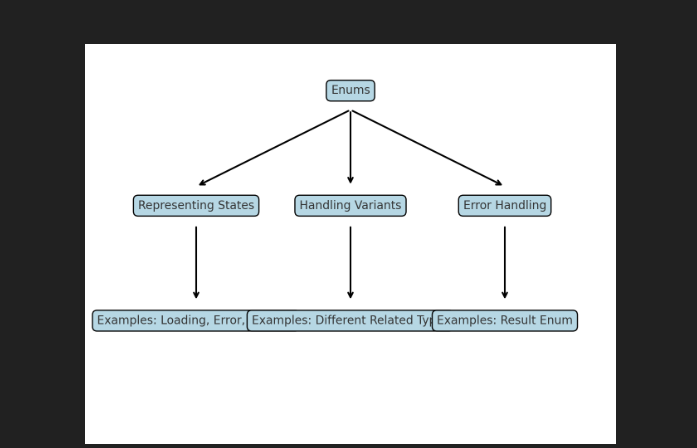
Here’s a diagram showing the common use cases of Enums in Rust:
Advanced Enums: Recursive Enums
A recursive enum is an enum where one of its variants refers to the same enum type itself.
Example:
enum TodoList {
    Task(String, Box<TodoList>), // A task + the rest of the list
    Empty,                       // End of the list
}

fn main() {
    // Creating a recursive Todo list: "Study" -> "Exercise" -> "Sleep" -> End
    let my_tasks = TodoList::Task(
        String::from("Study Rust"),
        Box::new(TodoList::Task(
            String::from("Do Exercise"),
            Box::new(TodoList::Task(
                String::from("Sleep Early"),
                Box::new(TodoList::Empty),
            )),
        )),
    );

    // Printing tasks using recursion
    print_tasks(&my_tasks);
}

fn print_tasks(list: &TodoList) {
    match list {
        TodoList::Task(task, next) => {
            println!("Task: {}", task);
            print_tasks(next); // recursive call
        }
        TodoList::Empty => println!("No more tasks!"),
    }
}
Output:

Learn Other Topics About Rust Programming
- What are Strings in Rust?
- What are Lifetimes in Rust?
- What is the Slices in Rust?
- What are the borrowing in Rust?

M.Sc. (Information Technology). I explain AI, AGI, Programming and future technologies in simple language. Founder of BoxOfLearn.com.