
What is RefCell<T>?
RefCell<T> is a special kind of smart pointer that allows you to change the value inside even if the container itself is not marked as mutable.
Normally, Rust’s strict borrowing rules are checked at compile time. You can have either one mutable reference or many immutable references, but not both at the same time.
With RefCell<T>, these rules are still enforced, but they are checked at runtime instead of compile time. This means your code can compile even in situations where the compiler would normally complain, as long as you follow the borrowing rules correctly when the program runs.
Why Use RefCell<T>?
- Interior Mutability: Modify data stored in an immutable structure.
- Runtime Borrow Checking: Borrowing rules are checked at runtime instead of compile time.
- Flexibility: Useful when designing APIs or working with shared ownership (Rc or Arc).
- Complex Data Structures: Mutate data in structures that the compiler cannot predict.
How RefCell Works In Rust?
There are step-by-step explanations about the RefCell pointer:
1) Immutable Access: You can get a read-only reference to the data stored inside a RefCell by calling the .borrow() method.
This works just like an immutable reference (&T); you can have multiple immutable borrows at the same time.
use std::cell::RefCell;

fn main() {
    let data = RefCell::new(100);

    let read1 = data.borrow();
    let read2 = data.borrow(); // Allowed: multiple immutable borrows
    println!("Values: {} and {}", read1, read2);
}
2) Mutable Access: You can use .borrow_mut() to modify the data inside a RefCell. This gives you a mutable reference (&mut T), but just like normal Rust rules, only one mutable borrow is allowed at a time.
use std::cell::RefCell;

fn main() {
    let data = RefCell::new(50);

    {
        let mut write = data.borrow_mut();
        *write += 10; // Modify the data
    } // Mutable borrow ends here

    println!("Updated value: {}", data.borrow());
}
3) Borrow Rules at Runtime: If you try to break Rust’s borrowing rules, your program will panic at runtime instead of failing to compile.
For example:
use std::cell::RefCell;

fn main() {
    let data = RefCell::new(42);

    let read = data.borrow();
    let write = data.borrow_mut(); // Panic: cannot borrow mutably while immutably borrowed
}
- In this code, RefCell<T> still protects memory safety; it just delays borrow checking until the program runs.
Example: Using RefCell<T> for Interior Mutability
Example code:
use std::cell::RefCell;

fn main() {
    // Create a RefCell that stores an integer value
    let number = RefCell::new(20);

    // Step 1: Borrow mutably to modify the value
    {
        let mut value = number.borrow_mut();  // Get a mutable reference
        *value += 10;                         // Change the value from 20 to 30
    } // Mutable borrow ends here (goes out of scope)

    // Step 2: Borrow immutably to read the value
    let final_value = number.borrow();       // Get an immutable reference
    println!("The final value inside RefCell is: {}", final_value);
}
Output:
The final value inside RefCell is: 30
Explanation:
- We start by creating a RefCell that stores the value 20.
- borrow_mut() gives us a mutable reference to the data inside the RefCell.
- borrow() gives an immutable reference to the inner value.
RefCell with Shared Ownership (Rc)
Rc gives shared ownership, so many places can access the data, and RefCell allows mutation by checking borrow rules at runtime instead of compile time. With this approach, you can safely modify shared data without breaking Rust’s safety rules.
Example: Combining Rc with RefCell
use std::rc::Rc;
use std::cell::RefCell;

fn main() {
    // Create a shared value that can be changed
    let shared_value = Rc::new(RefCell::new(50));

    // Clone Rc to create multiple owners
    let owner_a = Rc::clone(&shared_value);
    let owner_b = Rc::clone(&shared_value);

    // Modify the value through one owner
    {
        let mut data = owner_a.borrow_mut(); // Mutable access via RefCell
        *data += 25; // 50 + 25 = 75
    }

    // Access the updated value through another owner
    println!("Updated shared value: {}", owner_b.borrow()); // Output: 75
}
Output:
Updated shared value: 75Explanation:
- Rc::new() wraps the value in a reference-counted smart pointer.
- Rc::clone() increases the reference count, allowing both owner_a and owner_b to own the same data.
- Even though Rc makes the data immutable by default, wrapping it inside a RefCell allows us to mutate the inner value.
Limitations of RefCell<T>
RefCell<T> also comes with some important limitations you should understand before using it in real projects:
1) Runtime Overhead: RefCell checks borrowing rules at runtime. This adds a small performance cost because the program needs to track how many borrows exist while it’s running. In most cases, this cost is small, but it can matter in performance-critical code.
2) Runtime Panics: If you are trying to borrow mutably while an immutable borrow is still active, the program will panic at runtime. This is different from regular references, where such errors are caught at compile time.
3) Not Thread-Safe: RefCell<T> is designed only for single-threaded scenarios. If you attempt to share it across threads, you’ll encounter compiler errors. For multi-threaded programs where you need interior mutability, you should use thread-safe types like Mutex<T> or RwLock<T> instead.
Practical Use Cases of RefCell
RefCell<T> becomes extremely useful in real-world scenarios where Rust’s strict borrowing rules would normally make your code complicated or even impossible to write.
1) Graph Structures: In graph-based applications, you need to update nodes or edges while keeping the graph itself immutable. Using RefCell allows you to store nodes in an immutable structure but still modify their connections or data internally at runtime.
2) Tree Traversals: When working with tree-like data structures (such as DOM trees, syntax trees, or hierarchical menus), you may need to change parent-child relationships dynamically during traversal. RefCell makes this possible by allowing internal mutation without giving up the immutability of the overall tree.
3) Shared State: By combining Rc and RefCell, you can achieve shared ownership and safe mutation of that state.
Common Methods in RefCell
new(value): This method creates a new RefCell instance containing the given value. It’s the starting point when you want to use RefCell.
use std::cell::RefCell;

let cell = RefCell::new(42);
.borrow(): This method returns an immutable reference to the value inside the RefCell. You can use it to read the data without changing it.
let value = cell.borrow();
println!("Value: {}", value);
.borrow_mut(): This method gives you a mutable reference to the value. It allows you to change the data stored inside the RefCell.
*cell.borrow_mut() += 1;
.replace(value): This method replaces the existing value with a new one and returns the old value. It’s useful when you want to update the value completely.
let old = cell.replace(100);
println!("Old Value: {}", old);
.take(): This method takes the value out of the RefCell, leaving it empty (set to None). It’s useful when you need to move the data elsewhere.
let value = cell.take();
println!("Taken Value: {}", value);
RefCell vs Other Smart Pointers
| Feature | RefCell<T> | Rc<T> | Arc<T> | Mutex<T> |
|---|---|---|---|---|
| Mutability | Interior mutability | Immutable | Immutable | Mutable |
| Thread-Safety | Not thread-safe | Not thread-safe | Thread-safe | Thread-safe |
| Borrowing Rules | Enforced at runtime | No borrowing rules | No borrowing rules | Enforced with locks |
| Use Case | Single-threaded mutability | Single-threaded sharing | Multi-threaded sharing | Multi-threaded mutability |
Exercise: Managing a Shared Counter with RefCell
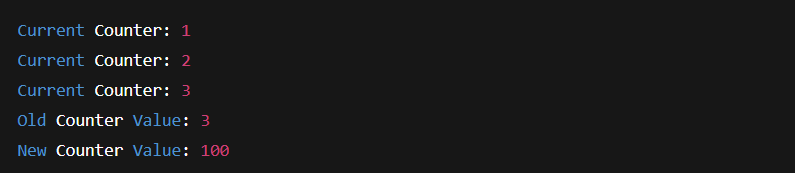
Building a simple app that counts the number of tasks completed. Multiple parts of your program need access to this counter to increment it or read its current value. Use RefCell to manage this shared counter safely.
Instructions:
- Create a RefCell containing an integer counter starting at 0.
- Increment the counter 3 times using mutable borrows.
- Read and print the counter after each increment.
- Finally, replace the counter with 100 and print the old value.
Example Solution:
use std::cell::RefCell;

fn main() {
    // Step 1: Create a RefCell counter
    let counter = RefCell::new(0);

    // Step 2: Increment the counter 3 times
    for _ in 0..3 {
        *counter.borrow_mut() += 1; // mutable borrow to increment
        println!("Current Counter: {}", counter.borrow()); // read the value
    }

    // Step 4: Replace the counter with 100
    let old_value = counter.replace(100);
    println!("Old Counter Value: {}", old_value);
    println!("New Counter Value: {}", counter.borrow());
}
Output:
Learn Other Topics About Rust
- What are threads in Rust?
- What is concurrency in Rust?
- What is error handling in Rust?
- What is an HashMap in Rust?
- What is an Iterator in Rust?
- What is Mutex in Rust?
- What is Async in Rust?

M.Sc. (Information Technology). I explain AI, AGI, Programming and future technologies in simple language. Founder of BoxOfLearn.com.