
Benchmarking measures the time taken by the code to run, allowing us to understand its performance.
You can easily know how much time a function or algorithm takes, so you can:
- Identify slow sections to detect which part of the program is taking more time than expected.
- Compare different solutions to determine whether two or more programs are taking longer than expected.
- Rewriting or improving time-consuming parts to enable the application to run efficiently.
Setting Up Benchmarking in Rust
Rust provides built-in support for benchmarking using the bencher crate. However, it’s available only on the nightly version of Rust, so you need to switch to nightly before you start your program.
1. Install Rust Nightly
Switch to the nightly version of Rust using the following installation command:
rustup install nightly
rustup default nightly
- This installs the nightly version and makes it your default compiler.
2. Enable Benchmarks in Cargo.toml
Next, you need to add the bencher crate under dev-dependencies, which is used only during development or testing:
[dev-dependencies]
bencher = "0.1"
Then, enable the benchmark configuration by this code:
[[bench]]
name = "my_benchmark"
harness = false
- [[bench]]: tells Cargo that you’re adding a benchmark target.
- name = “my_benchmark” is the name of your benchmark file.
- harness = false: Disables Rust’s built-in test runner and allows the bencher crate to handle benchmarking.
How To Writing a Benchmark In Rust?
The next step is to create actual benchmark tests. These tests measure how long specific functions take to run. In Rust, all benchmark files go inside a special folder called benches/ at the root of your project, and each .rs file inside this folder is treated as a separate benchmark.
Example: Benchmarking a Function
Let’s write a simple function that calculates the sum of numbers from 1 to n.
File: src/lib.rs
// A simple function to calculate the sum of numbers from 1 to n
pub fn sum_numbers(n: u64) -> u64 {
    (1..=n).sum()
}
In this code:
- pub fn means this function is public, so we can use it from another file.
- (1..=n).sum() creates a range from 1 to n and calculates the total.
reate a Benchmark File
Now, create a new folder called benches in your project root (if it doesn’t exist):
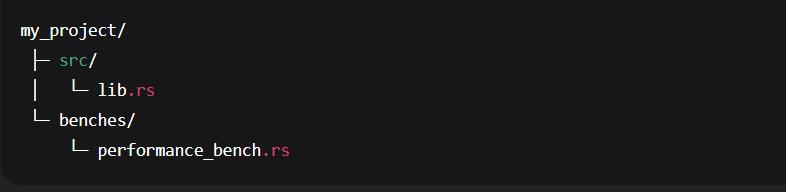
File: benches/my_benchmark.rs
// Import the bencher crate
extern crate bencher;

use bencher::Bencher;
use my_project::sum_numbers; // Replace `my_project` with your crate name

// This function defines the actual benchmark
fn benchmark_sum_numbers(b: &mut Bencher) {
    b.iter(|| {
        // The code inside this closure is what will be measured
        sum_numbers(10_000);
    });
}

// Register and run the benchmark
benchmark_group!(benches, benchmark_sum_numbers);
benchmark_main!(benches);
Output:
cargo bench
Explanation:
- extern crate bencher; loads the bencher crate to use its benchmarking tools.
- use bencher::Bencher; imports the Bencher type, which is responsible for running and measuring benchmarks.
How To Run Benchmarks In Rust?
Once you’ve created your benchmark tests inside the benches/ folder, running them is super easy. Rust provides a single command to execute all benchmarks in your project.
Run Benchmarks with Cargo:
cargo bench
Output Example
running 1 test
test benchmark_sum_numbers ... bench:      1,248 ns/iter (+/- 60)
Using Criterion for Advanced Benchmarking
The bencher crate is only used for simple benchmarks, and it only works with nightly Rust, but the Criterion crate solves both problems, and it’s a powerful, easy-to-use benchmarking library that works with stable Rust.
1. Add Criterion to Cargo.toml
[dev-dependencies]
criterion = "0.4"
- This installs the Criterion crate as a development dependency
2. Write a Benchmark
Create a new benchmark file inside the benches/ folder: benches/criterion_benchmark.rs
use criterion::{black_box, Criterion, criterion_group, criterion_main};
use my_project::compute_sum; // Replace `my_project` with your crate name

fn criterion_benchmark(c: &mut Criterion) {
    c.bench_function("compute_sum 1_000", |b| {
        // black_box prevents compiler optimizations from skipping the computation
        b.iter(|| compute_sum(black_box(1_000)));
    });
}

// Register the benchmark group and entry point
criterion_group!(benches, criterion_benchmark);
criterion_main!(benches);
3. Run Criterion Benchmarks
Run the benchmarks using:
cargo bench
Output Example:
compute_sum 1_000
                        time:   [1.234 ns 1.567 ns 1.890 ns]
Explanation:
- time shows the average time taken for the benchmark.
How To Compare a Multiple Implementations
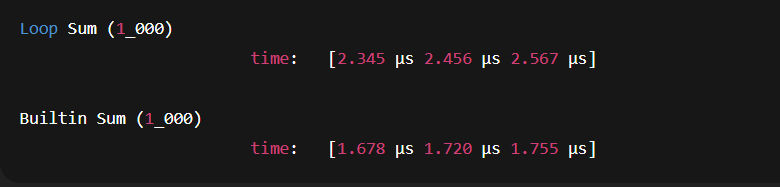
Benchmarks are useful for comparing different implementations of the same functionality.
Example: Comparing Two Functions
File: src/lib.rs
// Approach 1: Using a simple for loop
pub fn compute_sum_loop(n: u64) -> u64 {
    let mut total = 0;
    for i in 1..=n {
        total += i;
    }
    total
}

// Approach 2: Using Rust's built-in sum method
pub fn compute_sum_builtin(n: u64) -> u64 {
    (1..=n).sum()
}
Write a Benchmark to Compare Them
File: benches/compare_benchmark.rs
use criterion::{Criterion, criterion_group, criterion_main};
use my_project::{compute_sum_loop, compute_sum_builtin}; // Replace `my_project` with your crate name

fn compare_sums(c: &mut Criterion) {
    // Benchmark for the loop-based approach
    c.bench_function("Loop Sum (1_000)", |b| {
        b.iter(|| compute_sum_loop(1_000));
    });

    // Benchmark for the built-in sum method
    c.bench_function("Builtin Sum (1_000)", |b| {
        b.iter(|| compute_sum_builtin(1_000));
    });
}

// Register benchmark group and main entry point
criterion_group!(benches, compare_sums);
criterion_main!(benches);
Output:
Learn Other Topics About Rust
- What are threads in Rust?
- What is concurrency in Rust?
- What is error handling in Rust?
- What is an HashMap in Rust?
- What is an Iterator in Rust?
- What is Mutex in Rust?
- What is Async in Rust?

M.Sc. (Information Technology). I explain AI, AGI, Programming and future technologies in simple language. Founder of BoxOfLearn.com.