
An iterator is a powerful tool in Rust that gives you a safe, lazy, and efficient way to access items in a sequence.
In Rust, an iterator is any object that follows the Iterator trait, which means it must provide a next() method. This method is responsible for returning the next element in a sequence.
One important feature of iterators in Rust is that they are lazy. This means they don’t actually process or fetch any data until you explicitly use them, such as in a for loop or by calling methods like .collect() or .for_each().
Why Use Iterators?
- Elegant Syntax: Iterators allow you to write short, clean, and easy-to-read code instead of long for loops.
- Memory Efficiency: They process elements one by one without creating unnecessary temporary lists or copies, so they use less memory.
- Chaining and Flexibility: You can combine multiple operations like filtering, mapping, or collecting into a single line, making complex tasks simpler.
- Built-In Safety: Rust’s iterators automatically handle boundary checks, so you don’t risk errors like going beyond the end of a collection.
How To Create Iterators in Rust?
Rust provides several ways to create iterators:
1. Using iter() on Collections
The .iter() allows you to loop through items safely, without destroying or changing the original data.
The .next() method moves the iterator forward and returns Some(value) until it reaches the end, after which it returns None.
fn main() {
    let fruits = vec!["Apple", "Banana", "Mango"];

    // Create an iterator from the vector
    let mut fruit_iter = fruits.iter();

    println!("Fruits in the basket:");
    // Use .next() to go through each item
    while let Some(fruit) = fruit_iter.next() {
        println!("- {}", fruit);
    }

    // Original vector still exists because we only borrowed it
    println!("Total fruits: {}", fruits.len());
}
Output:
Fruits in the basket:
- Apple
- Banana
- Mango
Total fruits: 3
2. Using into_iter()
A .into_iter() is used when you want to take ownership of the elements from a collection (like a Vec). The collection is consumed, you can’t use it again after calling .into_iter().
fn main() {
    // Create a vector with some fruits
    let fruits = vec!["Apple", "Banana", "Mango"];

    // .into_iter() takes ownership of each item
    for fruit in fruits.into_iter() {
        println!("I am eating a {}", fruit);
    }

    // fruits cannot be used here anymore because it's moved
    // println!("{:?}", fruits); // This will cause a compile-time error
}
Output:
I am eating a Apple
I am eating a Banana
I am eating a Mango
3. Using iter_mut()
The .iter_mut() is used when you want to loop through a collection and change its elements directly. It creates a mutable iterator, which means you don’t just see the elements; you can actually modify them.
fn main() {
    // A vector of marks for three students
    let mut marks = vec![40, 50, 60];

    // Use iter_mut() to change values directly
    for mark in marks.iter_mut() {
        // *mark means we're accessing the actual value to modify it
        *mark += 10;
    }

    println!("Updated marks: {:?}", marks);
}
Output:
Updated marks: [50, 60, 70]Consuming Iterators In Rust
Iterators in Rust are consumed by methods like for loops, .collect(), or other iterator adaptors.
1) Consuming with a for Loop
A for loop is the most direct way to consume an iterator. It automatically calls next() behind the scenes until there’s no more data left.
Example: Printing All Items
fn main() {
    let fruits = vec!["Apple", "Banana", "Mango"];

    // The for loop takes ownership of the iterator and consumes it
    for fruit in fruits.iter() {
        println!("I like {}", fruit);
    }

    // Output:
    // I like Apple
    // I like Banana
    // I like Mango
}
2. Consuming with .collect()
The .collect() method transforms an iterator into a new collection (like a Vec, HashSet, or String). It goes through every item and gathers them into a container, which means it consumes the iterator completely.
Example: Creating a New Vector
fn main() {
    let numbers = vec![2, 4, 6];

    // Consume the iterator and collect doubled values into a new Vec
    let doubled_numbers: Vec<i32> = numbers.iter().map(|n| n * 2).collect();

    println!("Doubled values: {:?}", doubled_numbers);
}
Output:
Doubled values: [4, 8, 12]Chaining Iterator Methods
Chaining iterator methods means using multiple iterator functions one after another to transform, filter, or process data in a single flow, without needing loops or temporary variables.
1) .map()
The .map() method lets you change every item in an iterator into something else. It’s useful for applying a function or calculation to each element.
fn main() {
    let celsius = vec![0, 20, 30];
    let fahrenheit: Vec<i32> = celsius.iter().map(|&c| (c * 9 / 5) + 32).collect();

    println!("Fahrenheit: {:?}", fahrenheit);
}
Output:
Fahrenheit: [32, 68, 86]2) .filter()
The .filter() method removes elements that don’t match a condition. It’s perfect when you need only specific data from a list.
Example: Filter Passing Marks
fn main() {
    let marks = vec![35, 67, 90, 28, 76];
    let passed: Vec<i32> = marks.iter().filter(|&&m| m >= 40).cloned().collect();

    println!("Students passed: {:?}", passed);
}
Output:
Students passed: [67, 90, 76]3) .enumerate()
The .enumerate() allows you to track the index of each element while iterating. It’s useful for labelling, debugging, or when position matters.
Example: Numbered Shopping List
fn main() {
    let items = vec!["Milk", "Bread", "Eggs"];

    for (index, item) in items.iter().enumerate() {
        println!("{}. {}", index + 1, item);
    }
}
Output:
1. Milk
2. Bread
3. Eggs
4) .fold()
The .fold() is a powerful method that combines all items into a single result, like a sum, product, or string.
Example: Calculate Total Cost
fn main() {
    let prices = vec![120, 80, 100, 50];
    let total: i32 = prices.iter().fold(0, |acc, &price| acc + price);

    println!("Total cost: {}", total);
}
Output:
Total cost: 350
Creating Custom Iterators
You can create your own iterator by implementing the Iterator trait.
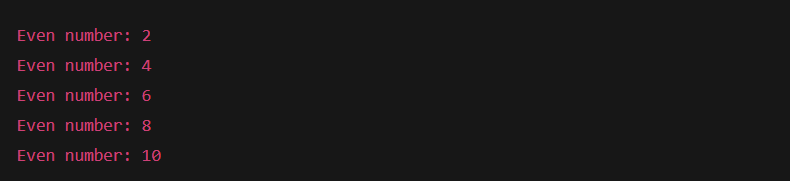
Example: Custom Iterator That Generates Even Numbers
struct EvenNumbers {
    current: u32,
    limit: u32,
}

impl EvenNumbers {
    fn new(limit: u32) -> Self {
        EvenNumbers { current: 0, limit }
    }
}

impl Iterator for EvenNumbers {
    type Item = u32;

    fn next(&mut self) -> Option<Self::Item> {
        self.current += 2;
        if self.current <= self.limit {
            Some(self.current)
        } else {
            None
        }
    }
}

fn main() {
    let mut evens = EvenNumbers::new(10);

    while let Some(num) = evens.next() {
        println!("Even number: {}", num);
    }
}
Output:
Learn More About Rust Programming
- What are Strings in Rust?
- What are Lifetimes in Rust?
- What is the Slices in Rust?
- What are the borrowing in Rust?
- What are the Structs in Rust?

M.Sc. (Information Technology). I explain AI, AGI, Programming and future technologies in simple language. Founder of BoxOfLearn.com.