
What Are Strings in Rust?
A string in Rust is a sequence of Unicode characters used for representing text. Rust provides two main forms of strings:
- String (String): It can grow, a heap-allocated data type that owns its contents, and you can add, remove, or modify it.
- String Slice (&str): it is just a view/reference to some text. You cannot change it because it only points to existing text.
Together, these two types allow Rust to handle text efficiently, balancing ownership, safety, and performance.
String vs. String Slice
| Feature | String | &str |
|---|---|---|
| Mutability | Mutable | Immutable |
| Storage | Heap | Stack or embedded in String |
| Ownership | Owns its data | Borrowed from another string |
| Use Case | Dynamic, growable text | Fixed, non-growable text |
How To Create Strings in Rust?
- Use String when you need to build or edit text.
- Use &str when you just need to read text.
- We can create a String using the String: :from function or the .to_string method.
fn main() {
    // Creating a growable String
    let mut city = String::from("Delhi");
    city.push_str(", India"); // adding more text
    println!("City String: {}", city);

    // Creating a string using .to_string()
    let language = "RustLang".to_string();
    println!("Language String: {}", language);

    // Creating a string slice
    let greeting: &str = "Good Morning!";
    println!("Greeting Slice: {}", greeting);
}
Output of this code:
City String: Delhi, India
Language String: RustLang
Greeting Slice: Good Morning!
Code Explanation:
- city is a String that can be changed (Delhi → Delhi, India).
- language is also a String, but made with .to_string().
- greeting is a string slice pointing to “Good Morning!”.
What Is String Operations In Rust?
In Rust, string operations are the actions that you can perform on strings, like joining them together, adding more text, or looping through their characters.
Concatenation (+ or format!) → You can join strings. The + operator moves the left string, while format! keeps everything safe and intact.
Appending (push, push_str) → Add a single character (push) or a slice of text (push_str) to an existing string.
Iteration (chars, bytes) → You can loop through a string by characters (Unicode-safe) or by bytes (raw numeric values)
Example Code:
fn main() {
    // Concatenation using + operator
    let first = String::from("Good");
    let second = String::from(" Morning");
    let combined = first + &second; // first is moved here
    println!("Concatenated: {}", combined);

    // Concatenation using format! macro (safer)
    let name = "Rustacean";
    let message = format!("Hello, {}! How are you?", name);
    println!("Formatted: {}", message);

    // Appending using push and push_str
    let mut country = String::from("India");
    country.push(' ');
    country.push_str("is amazing!");
    println!("Appended: {}", country);

    // Iterating through characters
    let word = "Rust";
    println!("Characters in '{}':", word);
    for ch in word.chars() {
        println!("{}", ch);
    }

    // Iterating through bytes
    println!("Bytes in '{}':", word);
    for b in word.bytes() {
        println!("{}", b);
    }
}
Output:
Concatenated: Good Morning
Formatted: Hello, Rustacean! How are you?
Appended: India is amazing!
Characters in 'Rust':
R
u
s
t
Bytes in 'Rust':
82
117
115
116
String Immutability and Memory Management in Rust
- String (String): A String is mutable (you can change it) and lives on the heap. When you assign it to another variable, ownership moves, and the old variable becomes invalid.
- String Slice (&str): A string slice (&str) is immutable (cannot be changed) and does not own data. It only borrows a reference to an existing string, which makes it lightweight and memory-safe.
Example of Ownership with String
fn main() {
    // Example with String (heap-allocated and mutable)
    let city1 = String::from("Paris");
    let city2 = city1; // ownership moves to city2

    // println!("{}", city1); // Error: city1 no longer valid
    println!("City2 owns the data now: {}", city2);

    // Example with String Slice (&str)
    let greeting: &str = "Hello, Rust!";
    println!("Greeting Slice: {}", greeting);

    // Borrowing from a String as a slice
    let language = String::from("RustLang");
    let borrowed: &str = &language;
    println!("Original String: {}", language);
    println!("Borrowed Slice: {}", borrowed);
}
Output:
City2 owns the data now: Paris
Greeting Slice: Hello, Rust!
Original String: RustLang
Borrowed Slice: RustLang
String Methods
Rust provides numerous methods for working with strings. Here are some commonly used methods:
- len
- is_empty
- replace
- split
- to_uppercase and to_lowercase
1) len → Length of String
This method returns the number of bytes in the string. Rust strings are UTF-8 encoded; the length may not always equal the number of visible characters if special symbols are used.
Example:
fn main() {
    let name = String::from("India");
    println!("The length of '{}' is {} bytes.", name, name.len());
}
Output:
The length of 'India' is 5 bytes.
2) is_empty → Check if String is Empty
This method checks if the string contains zero characters.
Example:
fn main() {
    let empty = String::new();
    let non_empty = String::from("RustLang");

    println!("Is 'empty' really empty? {}", empty.is_empty());
    println!("Is 'non_empty' empty? {}", non_empty.is_empty());
}
Output:
Is 'empty' really empty? true
Is 'non_empty' empty? false
3) replace → Replace Part of a String
It replaces all occurrences of a substring with another string.
Example:
fn main() {
    let sentence = String::from("I love Rust programming!");
    let new_sentence = sentence.replace("Rust", "Python");
    println!("After replace: {}", new_sentence);
}
Output:
After replace: I love Python programming!
4) split → Split String into Parts
It breaks the string into smaller substrings based on a delimiter.
Example:
fn main() {
    let data = "apple,banana,grape";
    for fruit in data.split(',') {
        println!("Fruit: {}", fruit);
    }
}
Output:
Fruit: apple
Fruit: banana
Fruit: grape
5) to_uppercase and to_lowercase → Change Case
These methods convert text into uppercase or lowercase letters.
Example:
fn main() {
    let word = String::from("RustLang");
    println!("Uppercase: {}", word.to_uppercase());
    println!("Lowercase: {}", word.to_lowercase());
}
Output:
Uppercase: RUSTLANG
Lowercase: rustlang
Unicode and Strings In Rust
Rust strings are UTF-8 encoded, which means they can store text from almost any language in the world (Hindi, Japanese, Arabic, Emojis, etc.). This makes Rust very powerful for international applications.
But some characters take more than one byte in UTF-8. For example, English letters like A take 1 byte, but Hindi letters like न or emojis like 😊 can take 3 or more bytes.
Accessing Unicode Characters
fn main() {
    let s = String::from("नमस्ते"); // Hindi for "Hello"

    // Iterating over characters
    for c in s.chars() {
        println!("{}", c);
    }
}
Output:
न
म
स
्
त
े
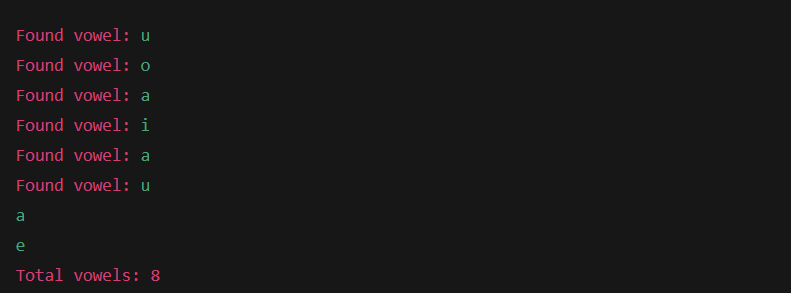
Exercise: Count Vowels in a String
Write a Rust program that:
- Takes a string (hardcoded or user-given).
- Counts how many vowels (a, e, i, o, u) are in the string (both uppercase and lowercase).
- Prints the total count along with the vowels found.
Example Code:
fn main() {
    let text = String::from("Rust Programming Language");

    let mut count = 0;
    for ch in text.chars() {
        if "aeiouAEIOU".contains(ch) {
            println!("Found vowel: {}", ch);
            count += 1;
        }
    }

    println!("Total vowels: {}", count);
}
Output:
Learn Other Topics About Rust Programming
- What are the Closures in Rust?
- What is the Rust programming language?
- How can we use data types in Rust?
- How can we use variables in Rust?
- What is Shadowing in Rust?
- What are Operators in Rust?
- What are the Functions in Rust?
- What are the Function Parameters in Rust?
- What is Borrowing in Rust?

M.Sc. (Information Technology). I explain AI, AGI, Programming and future technologies in simple language. Founder of BoxOfLearn.com.